Skip to content
Skip to content
No results
  • Home
  • Service
  • Price
  • Knowledge
  • Contact as
Application Trial14 Days testing
Mainlogo2 1
  • Home
  • Service
  • Price
  • Knowledge
  • Contact as
Mainlogo2 1

How can we help you?

hardware technik

  • Our POS Device

Video Training

  • Basic

Trax documentation root v1

  • 01-Getting Started & Setup
    • How to Secure Your First-Time Login Easily
    • Master Store Profile, Tax Setup, and Receipt Customization
    • User Interface Navigation, Status Indicators & Menus
  • 02-Hardware & Devices
    • Thermal Receipt Printer Setup Guide
    • PrintAgent Desktop Application & Background Service
    • Barcode Scanner & Electronic Cash Drawer Setup
    • Customer Facing Display (Dual-Screen Setup)
  • 03-Products & Inventory
    • Product Categories Management Guide
    • Adding & Managing Products (Catalog Setup)
    • VAT & Tax Rates Configuration Guide
    • Stock Tracking & Low Stock Alerts
    • Sub-products or options
  • 04-Suppliers & Supply Chain
    • Suppliers Directory & Smart Product Auto-Scanning
    • Adding & Managing Suppliers Manually (Product Association)
    • Exporting Suppliers to Excel & Batch Management Guide
  • 05-Customer Management & CRM
    • Store Customers Directory & Overview Statistics Guide
    • Adding & Updating Customer Profiles Guide
    • Customer Barcode Card & Invoice History Guide
  • 06-Daily POS Operations
    • Offline Mode Operations & IndexedDB Synchronization Guide
    • Cart Building, Barcode Scanning & Weighed Items Guide
    • Line Items Editing, Global Discounts & Customer Linking Guide
    • Checkout, Payment Modal & Change Calculation Guide
    • POS Top Toolbar: Device Status, Calculator & PIN Lock Guide
    • Offline Mode Operations & IndexedDB Synchronization Guide
  • 07-Invoices & Refunds
    • Invoices Archive & Multi-Criteria Search Guide
    • Thermal Reprint & Official PDF Export Guide
    • Returns, Refunds & Inventory Reversal Guide
  • 08-Cash Drawer & Shifts
    • TreeTable Stock Ledger & Variant Tracking Guide
View Categories
  • Home
  • Knowledge Base v1
  • Trax documentation root v1
  • 03-Products & Inventory
  • Stock Tracking & Low Stock Alerts

Stock Tracking & Low Stock Alerts

info@group-trax.com
Updated on October 7, 2026

< 1 min read

0:00 / 1:06
  • View as Markdown Open this page as plain Markdown (opens in a new tab)
  • Open in ChatGPT Ask questions about this page (opens in a new tab)
  • Open in Claude Ask questions about this page (opens in a new tab)
  • Open in Google AI Studio Ask questions about this page (Google account required) (opens in a new tab)

Automated inventory control prevents unexpected stockouts, optimizes working capital, and keeps your shelves stocked with high-demand retail items in TRAX Store Management System.


1. Real-Time Stock Deduction #

Every time a cashier completes a sale on the POS terminal:

  • Sold item quantities are instantly deducted from active inventory.
  • Returns and refunded items are automatically returned to available stock.
  • Inventory levels synchronize across all connected cashier terminals in real-time.

2. Minimum Reorder Thresholds (Low Stock Warning) #

  1. Go to the Store Page, then the tap Inventory , .
  2. For each product, the Low Stock Threshold is 50% from the total (This value is set by the program by default).
  3. Whenever physical stock reaches or drops below this threshold:
    • A warning badge triggers automatically in the inventory table.
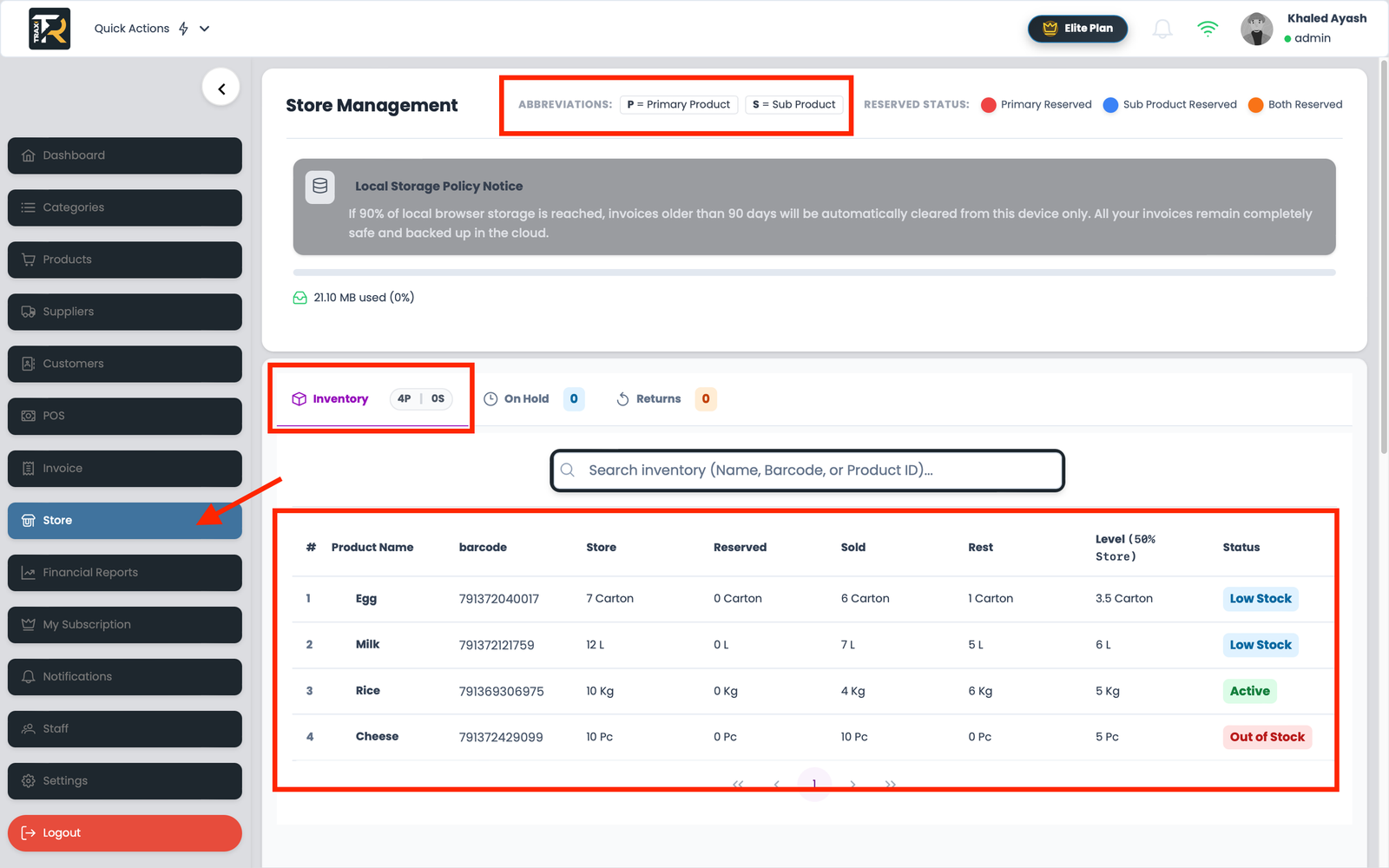
Visual Reference: Inventory & Stock Alerts Dashboard


3. Visual Stock Status Badges Explained #

  • 🟢 In Stock (Green): Healthy stock level well above the minimum threshold.
  • 🟡 Low Stock Warning (Blue): Quantity has fallen below the reorder point; reordering from suppliers is advised.
  • 🔴 Out of Stock (Red): Zero units available. Cashiers will be warned upon scanning to prevent negative inventory overselling.

Clarification between primary and secondary products, in case of internal secondary products, with a separate barcode for each product.

3-Catalog & Inventory
What are your Feelings
Share This Article :
  • Facebook
  • X
  • LinkedIn
  • Pinterest
Still stuck? How can we help?

How can we help?

Updated on October 7, 2026
VAT & Tax Rates Configuration GuideSub-products or options

Leave a ReplyCancel Reply

Your email address will not be published. Required fields are marked *

Table of Contents
  • 1. Real-Time Stock Deduction
  • 2. Minimum Reorder Thresholds (Low Stock Warning)
  • 3. Visual Stock Status Badges Explained
  • Home
  • Service
  • Price
  • Knowledge
  • Contact as
Mainlogo2 1

Copyright © 2026 -  by Ayash-Group


Trax Store Management Systeme