Skip to content
No results
  • Home
  • Service
  • Price
  • Knowledge
  • Contact as
Application Trial14 Days testing
group-trax.com
  • Home
  • Service
  • Price
  • Knowledge
  • Contact as
group-trax.com

How can we help you?

hardware technik

  • Our POS Device

Video Training

  • v01-cashier Basics
    • Cashier Basics in 90 Seconds
  • v02-Scanning & Fast Checkout
    • Scanning & Fast Checkout 

Trax documentation root v1

  • 01-Getting Started & Setup
    • How to Secure Your First-Time Login Easily
    • Master Store Profile, Tax Setup, and Receipt Customization
    • User Interface Navigation, Status Indicators & Menus
  • 02-Hardware & Devices
    • Thermal Receipt Printer Setup Guide
    • PrintAgent Desktop Application & Background Service
    • Barcode Scanner & Electronic Cash Drawer Setup
    • Customer Facing Display (Dual-Screen Setup)
  • 03-Products & Inventory
    • Product Categories Management Guide
    • Adding & Managing Products (Catalog Setup)
    • VAT & Tax Rates Configuration Guide
    • Stock Tracking & Low Stock Alerts
    • Barcode Label & Shelf Tag Printing Guide
  • 04-Suppliers & Supply Chain
    • Suppliers Directory & Smart Product Auto-Scanning
    • Adding & Managing Suppliers Manually (Product Association)
    • Exporting Suppliers to Excel & Batch Management Guide
  • 05-Customer Management & CRM
    • Store Customers Directory & Overview Statistics Guide
    • Adding & Updating Customer Profiles Guide
    • Customer Barcode Card & Invoice History Guide
  • 06-Daily POS Operations
    • Offline Mode Operations & IndexedDB Synchronization Guide
    • Cart Building, Barcode Scanning & Weighed Items Guide
    • Line Items Editing, Global Discounts & Customer Linking Guide
    • Checkout, Payment Modal & Change Calculation Guide
    • POS Top Toolbar: Device Status, Calculator & PIN Lock Guide
    • Offline Mode Operations & IndexedDB Synchronization Guide
  • 07-Invoices & Refunds
    • Invoices Archive & Multi-Criteria Search Guide
    • Thermal Reprint & Official PDF Export Guide
    • Returns, Refunds & Inventory Reversal Guide
  • 08-Cash Drawer & Shifts
    • TreeTable Stock Ledger & Variant Tracking Guide
View Categories
  • Home
  • Knowledge Base v1
  • Trax documentation root v1
  • 01-Getting Started & Setup
  • User Interface Navigation, Status Indicators & Menus

User Interface Navigation, Status Indicators & Menus

info@group-trax.com
Updated on September 13, 2026

2 min read

The TRAX POS interface is engineered for touchscreens, standard desktop monitors, and barcode scanner setups. It combines fast user interface navigation with real-time operational status indicators.


1. Top Header Toolbar & Live Indicators #

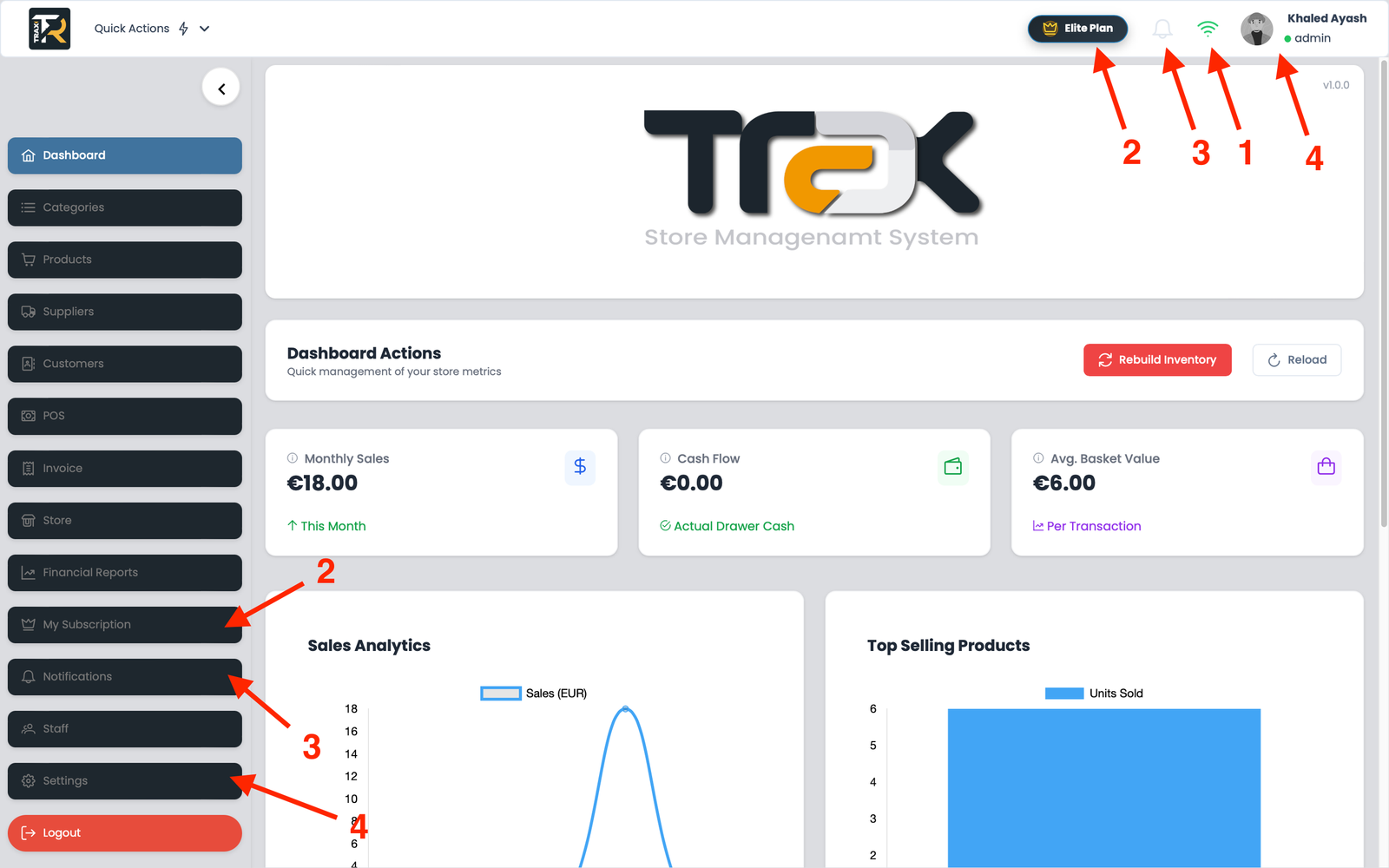
The persistent top header bar provides instant feedback across all screens:

  1. Network Connectivity Indicator (Online / Offline):
    • 🟢 Green WiFi (Online): Connected to cloud servers; all sales, products, and shifts sync instantly.
    • 🔴 Red WiFi (Offline Mode): Network connection is lost. The application automatically switches to local IndexedDB storage, allowing checkout, printing, and drawer operations to continue without interruption.
  2. Trial & Subscription Countdown Badge:
    • A golden widget showing remaining days and hours on your current store license. Clicking the badge opens the renewal dashboard.
  3. Real-Time Notification Bell:
    • Displays red notification badges for inventory restock alerts, daily shift closing notices, and management updates.
  4. User Profile & Shift Badge:
    • Displays the active user avatar, name, and operational status dot:
      • 🟢 Active: Clocked in and ready.
      • 🟡 Out of Work: Shift completed / clocked out.
      • 🔵 Holiday: Scheduled time-off.

Visual Reference: Dashboard & Navigation Tour #

(Upload and insert the generated pos_ui_tour image here)


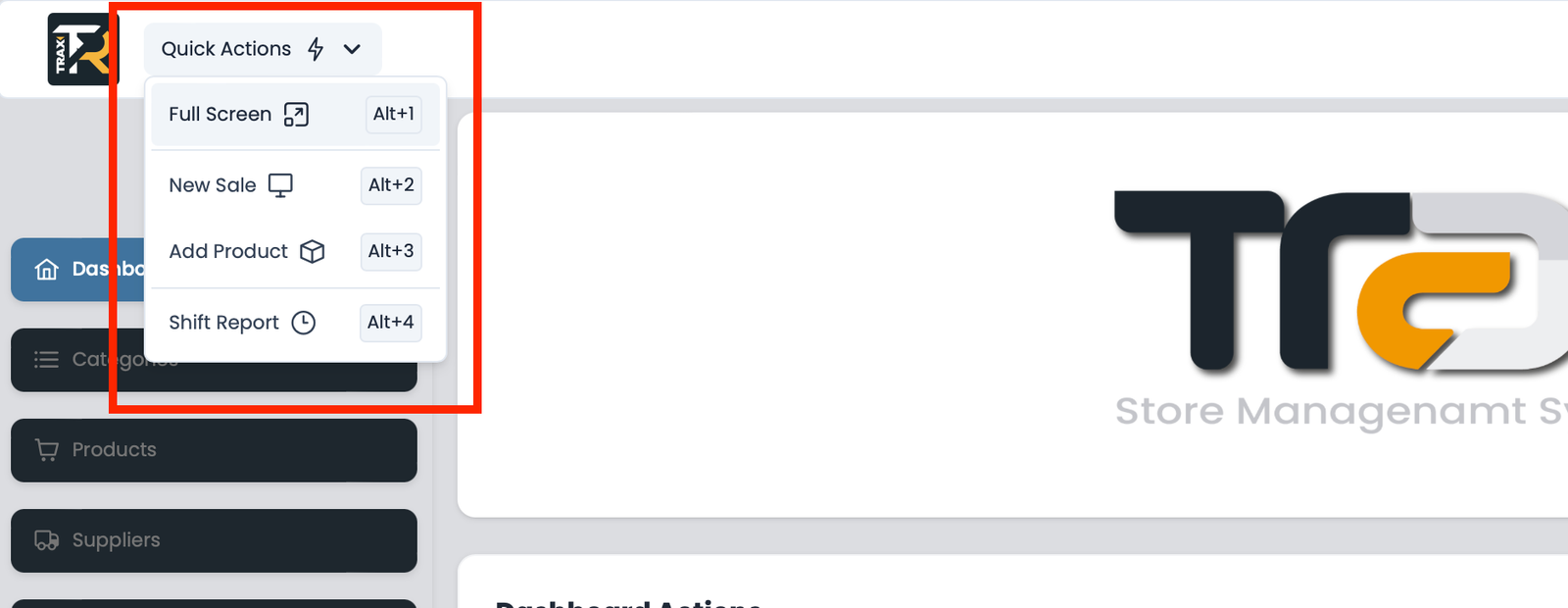
2. High-Speed Keyboard Shortcuts (Quick Actions) #

For maximum cashier speed without touching the mouse:

  • Alt + 1: Toggle Fullscreen Mode (ideal for dedicated POS terminals).
  • Alt + 2: Open a New Sale / Instant POS screen.
  • Alt + 3: Quick Add New Product (Admin only).
  • Alt + 4: Quick Shift Summary Report & Cash Drawer audit.
3. Collapsible Sidebar Navigation #

Click the arrow toggle () at the sidebar bottom to collapse the menu into an icon-only strip.

Moreover, this action maximizes screen real estate for retail operations.

  • 📊 Dashboard: High-level metrics, daily turnover charts, and net profits.
  • 📂 Categories & Products: Catalog setup, barcode generation, and stock management.
  • 🚚 Suppliers: Supplier database, purchase orders, and goods receiving.
  • 👥 Customers (CRM): Customer directory, credit limits, and loyalty balances.
  • 🖥️ POS: Real-time touch-enabled cash register interface.
  • 🧾 Invoices: Searchable transaction history, reprints, and customer returns.
  • 📈 Financial Reports: Z-Reports, VAT tax breakdowns, and cashier KPI metrics.
  • 👑 My Subscription: Plan tier details and upgrade workflows.
  • 👥 Staff: Cashier accounts, permissions matrix, and shift time tracking.
  • ⚙️ Settings: Thermal printers, barcode scanners, and fiscal compliance setup.

4. Tablet & Touchscreen Responsive Layout #

On smaller displays or POS tablets, the sidebar collapses into an intuitive Hamburger Menu (☰) to support user interface navigation. This preserves full-width grid layouts for product tiles and enables quick touch checkout.

1-Getting Started & Setup
What are your Feelings
Share This Article :
  • Facebook
  • X
  • LinkedIn
  • Pinterest
Still stuck? How can we help?

How can we help?

Updated on September 13, 2026
Master Store Profile, Tax Setup, and Receipt CustomizationHow to Secure Your First-Time Login Easily

Leave a ReplyCancel Reply

Your email address will not be published. Required fields are marked *

Table of Contents
  • 1. Top Header Toolbar & Live Indicators
  • Visual Reference: Dashboard & Navigation Tour
  • 2. High-Speed Keyboard Shortcuts (Quick Actions)
  • 3. Collapsible Sidebar Navigation
  • 4. Tablet & Touchscreen Responsive Layout
  • Home
  • Service
  • Price
  • Knowledge
  • Contact as

Copyright © 2026 -  by Ayash-Group


Trax Store Management Systeme