Skip to content
Skip to content
No results
  • Home
  • Service
  • Price
  • Knowledge
  • Contact as
Application Trial14 Days testing
Mainlogo2 1
  • Home
  • Service
  • Price
  • Knowledge
  • Contact as
Mainlogo2 1

How can we help you?

hardware technik

  • Our POS Device

Video Training

  • Basic

Trax documentation root v1

  • 01-Getting Started & Setup
    • How to Secure Your First-Time Login Easily
    • Master Store Profile, Tax Setup, and Receipt Customization
    • User Interface Navigation, Status Indicators & Menus
  • 02-Hardware & Devices
    • Thermal Receipt Printer Setup Guide
    • PrintAgent Desktop Application & Background Service
    • Barcode Scanner & Electronic Cash Drawer Setup
    • Customer Facing Display (Dual-Screen Setup)
  • 03-Products & Inventory
    • Product Categories Management Guide
    • Adding & Managing Products (Catalog Setup)
    • VAT & Tax Rates Configuration Guide
    • Stock Tracking & Low Stock Alerts
    • Sub-products or options
  • 04-Suppliers & Supply Chain
    • Suppliers Directory & Smart Product Auto-Scanning
    • Adding & Managing Suppliers Manually (Product Association)
    • Exporting Suppliers to Excel & Batch Management Guide
  • 05-Customer Management & CRM
    • Store Customers Directory & Overview Statistics Guide
    • Adding & Updating Customer Profiles Guide
    • Customer Barcode Card & Invoice History Guide
  • 06-Daily POS Operations
    • Offline Mode Operations & IndexedDB Synchronization Guide
    • Cart Building, Barcode Scanning & Weighed Items Guide
    • Line Items Editing, Global Discounts & Customer Linking Guide
    • Checkout, Payment Modal & Change Calculation Guide
    • POS Top Toolbar: Device Status, Calculator & PIN Lock Guide
    • Offline Mode Operations & IndexedDB Synchronization Guide
  • 07-Invoices & Refunds
    • Invoices Archive & Multi-Criteria Search Guide
    • Thermal Reprint & Official PDF Export Guide
    • Returns, Refunds & Inventory Reversal Guide
  • 08-Cash Drawer & Shifts
    • TreeTable Stock Ledger & Variant Tracking Guide
View Categories
  • Home
  • Knowledge Base v1
  • Trax documentation root v1
  • 05-Customer Management & CRM
  • Store Customers Directory & Overview Statistics Guide

Store Customers Directory & Overview Statistics Guide

info@group-trax.com
Updated on October 12, 2026

1 min read

0:00 / 1:37
  • View as Markdown Open this page as plain Markdown (opens in a new tab)
  • Open in ChatGPT Ask questions about this page (opens in a new tab)
  • Open in Claude Ask questions about this page (opens in a new tab)
  • Open in Google AI Studio Ask questions about this page (Google account required) (opens in a new tab)

The Store Customers Management module in TRAX Store Management System allows retail businesses to build customer relationships, track spending habits, and link checkout transactions to individual customer profiles.


1. Navigation & Access Control #

  • Route Path: Navigate to /home/customers from the primary sidebar menu.
  • Permissions: Accessible by Store Administrators (Admin) and Store Managers.
  • Subscription Feature Key: Governed by the crm feature in your store subscription plan.

2. Real-Time Customer Summary Cards #

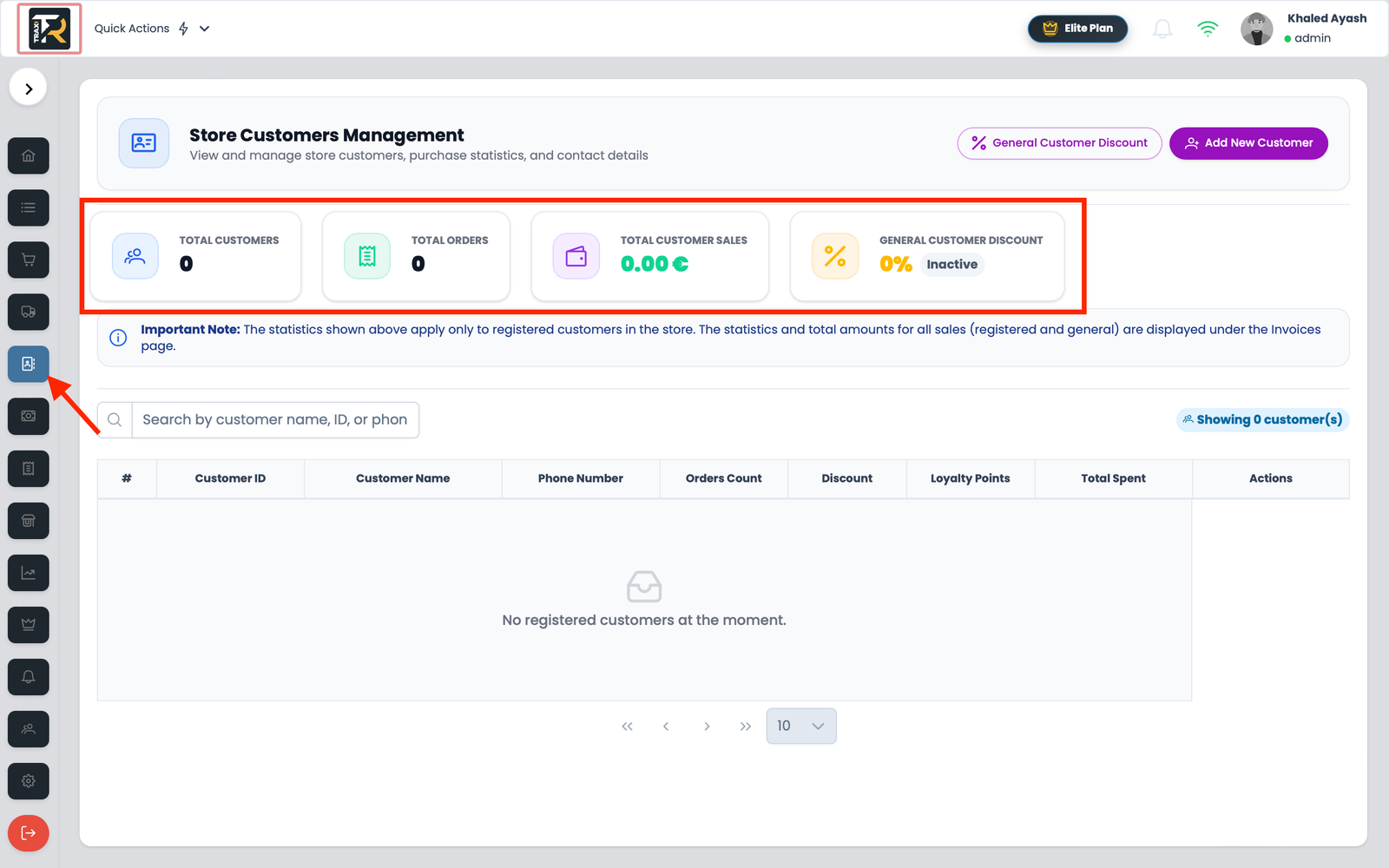
At the top of the Customers page, three live metric cards summarize your customer engagement:

  1. Total Customers (👥): Total number of registered active customer profiles in your store database.
  2. Total Orders (🧾): Cumulative count of completed checkout sales linked to registered customers.
  3. Total Customer Sales (💰): Total revenue generated from registered customer purchases (calculated live in Euros € by aggregating both cloud database records and local offline invoices).
  4. Genral Customer Discount ():

Visual Reference: Customers Management Table & Summary Cards


3. Customers Data Table Breakdown #

The main directory table provides quick insights into customer activity:

Column HeaderField Details & Behavior
#Row index number.
Customer IDUnique customer identification number with a blue barcode icon (pi pi-barcode). Clicking the ID immediately opens the Customer Details modal.
Customer NamePrimary client name (displayed in bold text).
PhoneCustomer contact number formatted with phone icon (pi pi-phone). Displays “Not specified” if empty.
Orders CountBlue tag badge (p-tag) displaying total historical order count.
Total SpentTotal expenditure in Euros formatted to two decimal places (e.g., 18,450.00 €).
Discount
Loyalty Points
ActionsAction buttons: View Details (Eye), Edit (Pencil), and Delete (Trash).

4. Real-Time Search #

  • Debounced Search Bar: Type any customer name, phone number, or email into the search box. The list filters dynamically after 600ms without reloading the page.
  • Clear Search: Click the (✕) button on the right side of the input to reset search filters instantly.

5-Customer Management & CRM
What are your Feelings
Share This Article :
  • Facebook
  • X
  • LinkedIn
  • Pinterest
Still stuck? How can we help?

How can we help?

Updated on October 12, 2026
Customer Barcode Card & Invoice History GuideAdding & Updating Customer Profiles Guide

Leave a ReplyCancel Reply

Your email address will not be published. Required fields are marked *

Table of Contents
  • 1. Navigation & Access Control
  • 2. Real-Time Customer Summary Cards
  • 3. Customers Data Table Breakdown
  • 4. Real-Time Search
  • Home
  • Service
  • Price
  • Knowledge
  • Contact as
Mainlogo2 1

Copyright © 2026 -  by Ayash-Group


Trax Store Management Systeme